

Airbnb is a popular platform that allows hosts to earn income by hosting short-term guests. While getting started is relatively simple, small gaps in your knowledge can lead to oversights that affect bookings, regulatory compliance, and the guest experience.
Here’s everything you need to know about Airbnb, including answers to questions you haven’t even thought to ask yet.
Getting started with Airbnb hosting
Airbnb has a simple sign-up process, but there are some fine details you need to know for a smooth start to your business.
How do I become an Airbnb host?
There are seven simple steps to becoming an Airbnb host:
- Visit the Airbnb website and create a host account
- Verify your identity
- Upload any required paperwork
- Write a listing description
- Upload photographs of the property
- Set nightly rates
- Wait for confirmation
What types of properties can I list on Airbnb?
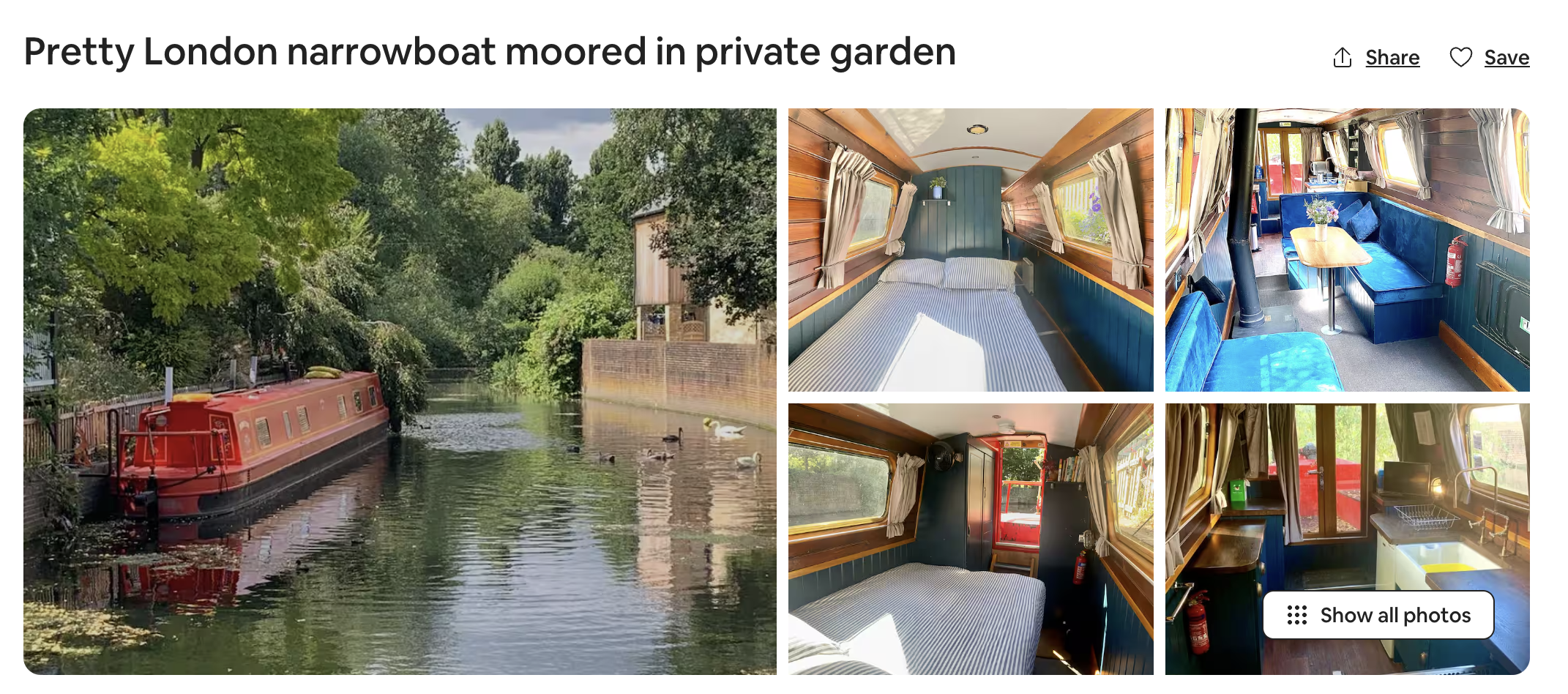
You can list most types of properties on Airbnb, including boats, caravans, and treehouses, provided they meet the platform guidelines. But if you don’t own the property, you must check that subletting is allowed under your lease agreement.
Can I rent out just a room, or does it need to be the entire property?
You don’t need to rent out the entire property to host on Airbnb — a single room is allowed. Just be upfront about this in your listing description, and check the short-term rental regulations for your area to see whether this places extra requirements on you as a host.
How long does it take to get my listing approved?
Airbnb usually approves listings within 24 hours, but it can take up to three days. The process may take longer if there are any missing details or paperwork, or if listings don’t meet the platform guidelines.
Creating and optimizing your Airbnb listing
Making sure your Airbnb listing appeals to guests from the start helps you get those early bookings and start building momentum.
How can I improve my Airbnb listing’s visibility and ranking?
You can rank higher on Airbnb through the following best practices:
- Focus on key differentiators in the title
- Write a clear listing description
- Include unique features and amenities in the description
- Upload a range of high-quality photographs
- Set competitive Airbnb pricing
- Collect positive reviews and reviews
How important are photos for my Airbnb listing?
Photos are the most important parts of your Airbnb listing because they’re what first catches a guest’s attention. Investing in a professional photographer is often worthwhile, as high-quality images consistently lead to more views and bookings.
| Host tip: “What I have found on Airbnb is you have to know your guest and what they are looking for. Your first three pictures have to be your best —you have to get them to stop scrolling and stop on your place.”
— Misty Valdez, 282 Timbuktu |
How do I write an effective listing description?
An effective listing description is clear and transparent. Using simple, friendly language and getting straight to the point helps guests decide if your property is right for them. You can also highlight your best features to appeal to your target audience and get higher-quality leads.
What amenities should I provide?
Guests expect a basic standard of comfort when booking an Airbnb, so aim to provide the essentials, including:
- Clean linens
- Basic toiletries
- Reliable WiFi
- AC and heating
- Cookware
Should I enable Instant Book or require approval?
Enabling Instant Book on Airbnb generally leads to more reservations because potential guests don’t need to wait for approval. You can get people booking last-minute trips. However, requiring approval works best if you can fill your calendar in advance and prefer to have more control over who stays at your properties.
Airbnb host fees and payments
Payments are a big consideration for Airbnb hosts — uncertainty about fees, transfers, and payment methods makes financial management harder.
What fees does Airbnb charge hosts?
Airbnb charges hosts 14-16% commission per booking. As of December 2025, they have phased out the split fee system, where hosts and guests could share the charges.
How and when do I get paid by Airbnb?
Airbnb payment timelines are based on your reservation type:
- 27 nights or less: By the end of the business day following the checkout date
- 28 nights or more: By the end of the business day following the check-in date, and then monthly installments
- Airbnb Experiences: By the end of the day after you delivered the service
What payment methods can I use to receive Airbnb payouts?
You can choose from several Airbnb payout methods (location-dependent):
- Card
- Direct deposit
- Bank account
- Fast Pay
- PayPal
- Payoneer
- International wire transfer
- Western Union
Can I set my own prices, or does Airbnb control pricing?
You’re free to set any price you want for your property on Airbnb. You can also use Airbnb’s Smart Pricing tool to automatically adjust your rates based on trends in your local area. The final decision always remains with you, and Smart Pricing can be turned on or off whenever you like.
How does Airbnb Smart Pricing work?
Airbnb Smart Pricing adjusts your nightly rate based on demand, seasonality, and nearby competitors. You can set a minimum and maximum price so the tool stays within your comfort range.
If you want more control, however, consider specialist dynamic pricing tools that integrate with Airbnb and property management software (PMS) like Hostfully.

What happens if a guest cancels their booking?
If a guest cancels their booking, Airbnb automatically applies a refund based on your chosen cancellation policy:
- Flexible: Full refund up to 24 hours before check-in
- Moderate: Full refund up to five days before check-in
- Limited: Full refund up to 14 days before check-in, and a 50% refund up to seven days before
- Firm: Full refund up to 30 days before check-in, and a 50% refund up to seven days before
Legal and tax requirements for Airbnb hosts
Running a short-term rental business comes with various legal requirements. Understanding what you need to do can prevent significant issues later down the line.
Do I need to pay taxes on my Airbnb income?
Yes, Airbnb income is usually taxable. The main exception is when earnings fall below the threshold set by your country or state because you’ve only let your property for a short period during the year.
What are the legal requirements for hosting in my area?
In many areas, Airbnb hosts need to:
- Register their property as a short-term rental
- Obtain a permit
- Undergo safety inspections
- Pay an annual fee
- Include your license number in your Airbnb listing
Note that Airbnb cooperates with local authorities and may suspend your account if they believe you haven’t met requirements.
Can I host on Airbnb if I’m renting or have a mortgage?
Yes, you may be able to host, but you should check the terms of your lease or mortgage agreement. In most cases, you need permission from your landlord before listing.
What about HOA restrictions and condo association rules?
HOAs and condo associations may restrict or ban short-term rentals. It’s your responsibility to check whether you can use your property for an Airbnb in your neighborhood before listing.
Do I need special insurance for Airbnb hosting?
Yes, you need special insurance for your Airbnb because standard home insurance won’t cover short-term rentals. Your existing policy is likely to have gaps that won’t cover significant expenses like guest damage or loss of income.
Hostfully partners with a range of short-term rental insurance providers to make shopping for coverage easier.
How does Airbnb’s AirCover protection work?
Airbnb includes AirCover protection with every booking, free of charge. It includes $3 million damage protection and $1 million host liability insurance alongside guest screening and ID verification services.
Managing bookings and guest communication
Communication isn’t just an Airbnb feature. The platform has strict requirements about how and when to talk to guests to ensure you provide a quality service.
How do I communicate with guests before their arrival?
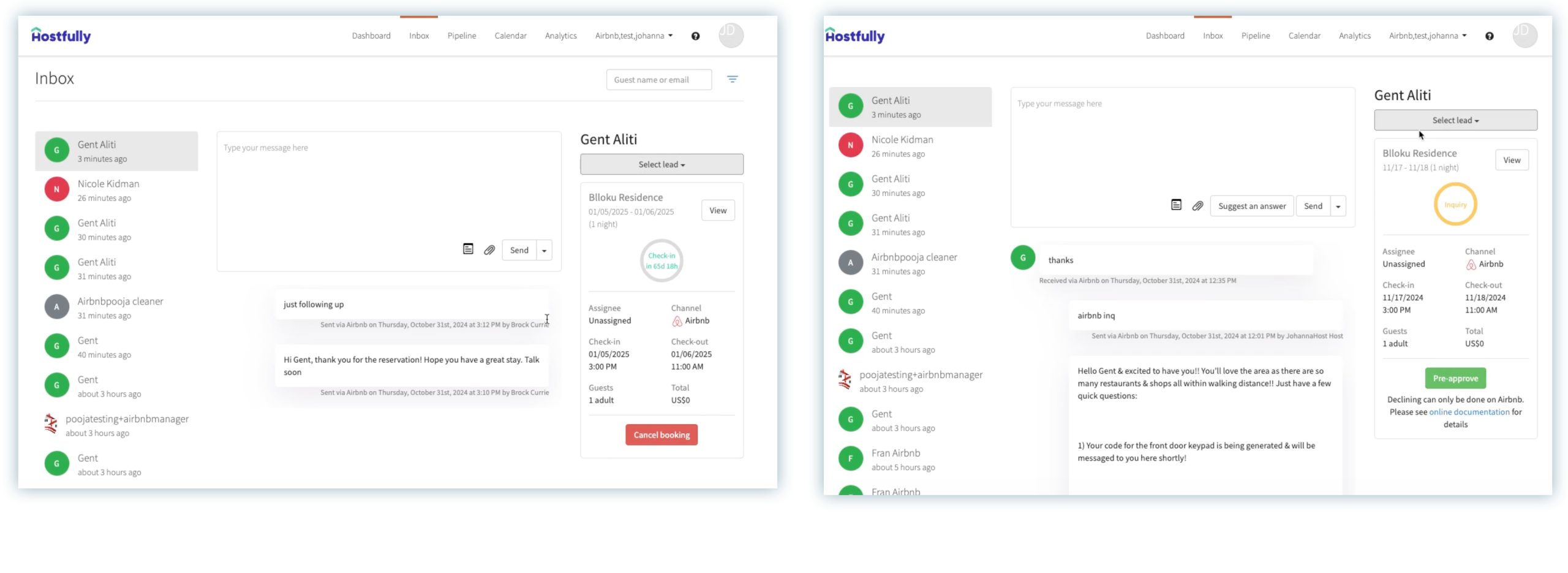
Hosts can communicate with guests using the in-app feature. Alternatively, you can integrate Airbnb with the guest communication tool in PMS like Hostfully to centralize and automate all your messaging.
What information should I include in my Airbnb welcome message?
Your welcome message on Airbnb should include:
- Check-in times and instructions
- Access details
- House rules
- Parking
- Where to meet you (if necessary)
- Lock codes
How quickly do I need to respond to guest inquiries?
Airbnb recommends that you respond to guest inquiries within 24 hours, but they warn guests that it might sometimes take longer. If you consistently fail to reply to messages on time, it can affect your visibility in ranking and your Superhost eligibility.
| Host tip: “Be responsive. The platform tracks your response time and so be sure to answer queries as soon as possible. Even if you don’t have the answer to hand, a quick reply letting them know you’ll check the info is a good idea.”
— Karen Holmes, Westhills Courtyard |
Can I decline a booking request?
Yes, Airbnb allows you to decline any booking requests provided you do so within 24 hours. If you find you can accommodate them later, you’re free to ask the user to send a new request.
What are Airbnb house rules, and why are they important?
Airbnb enables hosts to include house rules at the bottom of each listing. These include check-in and check-out times, quiet hours, and whether pets are allowed plus any custom rules. House rules are important because they set expectations for your guests and give you grounds to take action against anyone misusing your property.
How do I handle special requests from guests?
The best way to handle special requests depends on what Airbnb guests are asking. Many guests ask whether they can arrive early, depart late, or leave their baggage at your property. If a request doesn’t cause issues, accommodating them where possible can lead to better reviews.
Check-in, check-out, and turnaround
Check-in and check-out are the two most important times in the guest’s stay. Here’s what to know about how to handle them through Airbnb:
What are reasonable check-in and check-out times?
Most hosts set check-in for early to mid-afternoon and check-out for late morning. This gives guests adequate time to rest and prepare to leave while ensuring you have a few hours to clean the property.
Should I meet guests in person or offer self-check-in?
Airbnb lets hosts decide whether to meet guests in person or offer self-check-in. However, keyless locks are becoming a more popular option as both hosts and guests prefer the convenience and the technology integrates with your PMS.
| Host tip: “Using digital locks instead of keys is huge. It’s easy on guests, secure and you have codes automatically created, sent to guests, and deleted for each guest all automatically. It looks professional, automated and helps you keep an eye on the property.”
— Jason Decker, The Well Hotel and Taproom |
Can I charge a cleaning fee?
Yes, you can charge a cleaning fee to cover the cost of preparing your property for each stay. Airbnb includes this fee in your nightly rates and booking total, so it’s important to factor it into your overall pricing strategy.
Reviews, ratings, and Superhost status
Understanding how Airbnb ratings and reviews work is key to success because they help you attract guests.
How does the Airbnb review system work?
After each stay, both you and the guest are invited to leave a review. Airbnb automatically publishes these once you’ve both submitted them, or after 14 days if one person has failed to respond. This system encourages honest feedback, allows Airbnb to monitor performance, and helps future guests make informed decisions.
What happens if I get a bad review?
| Host tip: “It’s important that you act as quickly as possible, because you only have 14 days post-checkout to respond. Check if the review is valid, and write a public response that addresses the concerns mentioned.
From there, it’s crucial that you adjust as necessary: maybe you’re overpromising your listing, or maybe you’re not responding to queries fast enough. Oftentimes, being responsive can result in guests leaving a more positive review, even when things have gone wrong.” — Christian Suzon, Hometime |
Can I respond to guest reviews?
Yes, you can publicly respond to Airbnb guest reviews. You can thank guests for positive feedback, address concerns raised in negative reviews, or get more details about potential issues.
How important are Airbnb ratings vs written reviews?
Airbnb ratings and reviews are important in different ways. Ratings ensure you remain high in the search algorithm, so you appear first to users in searches, whereas reviews convince them to make the booking.
What is Superhost status, and how do I achieve it?
Superhost status recognises hosts who consistently provide great guest experiences. To qualify, you need to meet the following criteria:
- a minimum 4.8 overall rating
- at least 10 completed stays or 100 nights
- a response rate of 90% or higher
- a cancellation rate below 1%
Safety, security, and problem resolution
Most Airbnb guests will treat your property with care, but some cause issues. Let’s see how you can deal with them with the platform’s assistance:
How does Airbnb verify guests?
Airbnb uses several methods to verify guests, including ID checks, phone number verification, and payment verification. Some guests have reviews from previous stays, which can help you assess their reliability.
What if a guest violates house rules?
If a guest breaks your house rules, address the issue promptly through Airbnb messaging. Minor issues can often be resolved with clear communication, while serious violations should be reported to Airbnb. In some cases, Airbnb may cancel the stay if guests repeatedly ignore important rules.
What should I do if guests damage my property?
If guests cause damage, document it immediately with photos and messages through Airbnb. You can then submit a claim through Airbnb’s Resolution Center within 14 days of the check-out date to make a claim.
How do I handle guest complaints during their stay?
You must handle all complaints through Airbnb in case you need the platform to mediate. Respond quickly to the guest to address any issues and contact the support team if you can’t reach a resolution or feel the complaint is unfair.
Troubleshooting serious Airbnb host issues
While Airbnb hosts are unlikely to run into serious issues, it’s always best to understand what you’d need to do for a fast resolution and peace of mind.
What if Airbnb suspends or removes my listing?
If Airbnb suspends or removes your listing, they should notify you of the reason. You can see what the underlying issue is, and either attempt to resolve it or appeal their decision.
Airbnb only removes listings without opportunities to resolve issues in extreme cases, such as fraud or negligence.
How do I appeal a decision made by Airbnb?
You can appeal decisions by contacting support and providing as much evidence as possible, such as messages, photos, or documents. Airbnb reviews appeals on a case-by-case basis.
What happens if I need to cancel a confirmed booking?
Host cancellations are subject to fees based on the reservation amount and time of cancellation. They may also lead to suspensions and permanent bans in severe cases. If you have a valid reason, such as a serious illness or severe weather conditions, Airbnb waives these penalties.
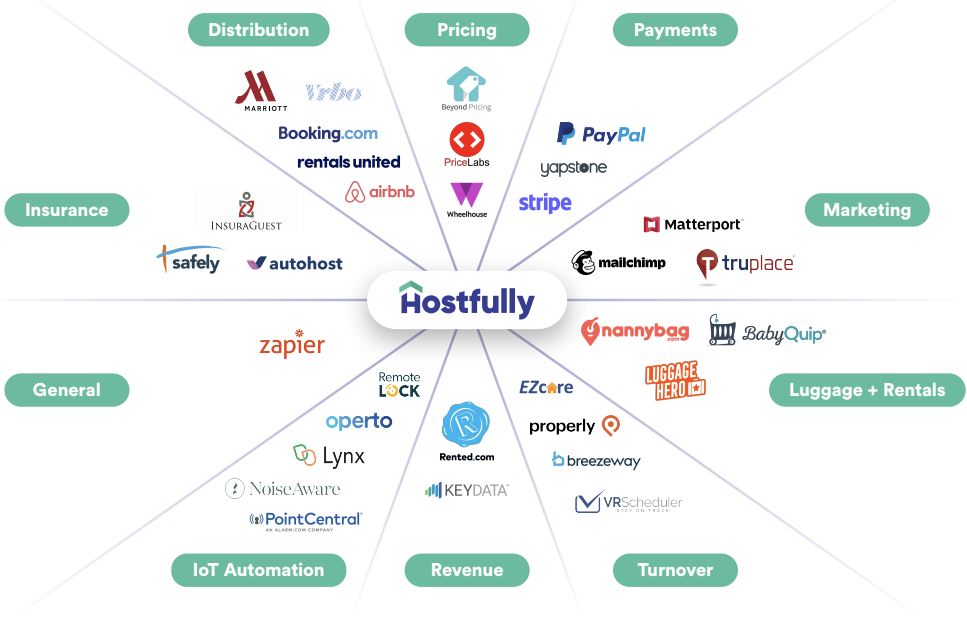
A channel manager like Hostfully can help you avoid double-bookings by syncing listing data across sites so you’re less likely to need to cancel.
Where can I get additional support as a host?
You can access support through the Help Center, live chat, or phone support. Hosts can also visit the Airbnb Community Centre to ask questions and share advice with others.
Answer Airbnb questions (and everything else) with Hostfully
Running an Airbnb involves finding answers to questions about pricing, platform rules, and guest concerns. But the real challenge isn’t knowing everything — it’s having systems in place so common issues don’t slow you down or force constant second-guessing.
Hostfully helps you bring structure to your Airbnb business by centralizing your tools, automating repeatable work, and keeping your operations aligned as you grow.
With Hostfully PMS, you can:
- Manage Airbnb and other channels from one centralized dashboard
- Keep calendars, pricing, and availability in sync to avoid costly mistakes
- Automate communication and workflows that reduce operational friction
- Standardize property information and rules across your portfolio
- Coordinate cleaning, maintenance, and turnovers with your team
- Maintain clear records to support disputes and compliance needs
Taken together, these features let you spend less time navigating Airbnb’s complexities and more time running a stable, scalable short-term rental business with Hostfully.



