

Vacation rental payments look simple from the outside. A guest makes a reservation, enters their card details, and the money arrives in your account, right?
For property managers, the reality is rarely that straightforward.
Behind every booking, there are decisions that affect how quickly you get paid, how much revenue you keep, and how much manual work your team has to take on. You also need to consider additional fees, taxes, and refunds, not to mention the possibility of fraud.
But there are ways to make vacation rental payments simpler. Let’s look at how these payments work, how to collect them, and what to look for in a payment setup.
What are vacation rental payments and how do they work?
Vacation rental payments are all the charges a guest has to pay before, during, and after the reservation. That usually starts with the booking payment itself, but may also include security deposits, cleaning fees, and optional extras.
The goal isn’t just to collect these charges, but to do it in a way that’s secure, easy to track, and manageable at scale.
From the guest’s perspective, the process is fairly simple. They book through your website or a listing site, enter their details, and confirm the reservation. Afterward, the payment gateway takes over the rest of the process.
Behind the scenes, the situation is more complex. The payment processor authorizes the payment, captures the funds, and sends the money to your account. There’s also a choice of hosted gateways, where guests are redirected to a secure external page, and integrated, which keeps the check-out process on your own site.
How do you collect vacation rental payments?
There are a few different ways to collect vacation rental payments, and many businesses end up using a mix of them depending on how they take bookings.
Taking payments via Online Travel Agencies (OTAs)
If you list your vacation rental on OTAs like Airbnb, Vrbo, or Booking.com, the platform usually collects the guest’s payment for you. It then sends the funds to you after deducting its commission.
While OTAs are convenient, they give you less control. You won’t receive the money until after check-in in many cases, which can create cash-flow issues. Additionally, you’re tied to their policies, timelines, and payment systems.
Channel managers like Hostfully can soften some of the complexity by syncing listings across all your platforms. That means your listing, availability, and reservation data stay connected even if the payment side follows different rules.
Collecting payments from direct bookings
Direct bookings give you more control over the payment process. You can decide how to collect the money, when to transfer funds, and whether to split the payments into stages. This also means you can offer guests more payment options, so they can choose whichever method they’re most comfortable with.
The extra control is one reason many hosts invest in a direct booking site. Solutions like Hostfully even help you create a website that’s specially set up for short-term rental bookings, payments, and communication. For example, our platform has booking widgets that let you capture reservations and sync the data with the rest of your Property Management System (PMS).

Sending payment links or invoices
Some property managers also go the traditional route and send invoices or payment links. This method works well for custom bookings, repeat guests, or longer stays where you need to confirm the details before you take payment. However, it’s likely to introduce more friction to the payment process and create more work for your team.
Why you should automate payments
As your business grows, manual transfers become harder to manage. Automation makes it easier to stay on top of payments, deposits, and refunds no matter how many bookings you take.
Some of the main reasons to automate vacation rental payments include:
- Less admin: You do not have to remember when to charge deposits, send reminders, or process refunds one by one.
- Fewer missed or late payments: Scheduled charges reduce the risk of guests forgetting to pay.
- Better cash flow control: Transfers are more immediate, so you have more control over your account balance.
- Easier deposit management: You can collect and release deposits automatically instead of managing the process yourself.
- Stronger fraud protection: Most payment tools include built-in safeguards to detect and prevent suspicious transfers.
- Clearer reporting: Centralized tracking makes it easier to see transfers and pending payments to help you understand your financial performance.
- More support for international guests: Automated systems usually provide more options for international visitors with different currencies and bank accounts.
- A smoother experience: Guests can pay quickly through a secure, familiar process instead of dealing with emails, bank details, or manual instructions.
This is where connected payment tools make a real difference. PMSs like Hostfully support the most popular payment processors, so you can automate guest payments, deposits, and refunds while keeping them tied to the rest of your booking workflow.
What payment methods can you offer guests?
Assuming you take direct bookings, you need to decide which payment methods to offer guests. A mix usually works best. Guests are more likely to find an option that works for them, simplifying the booking process on their side.
Here are some of the most common payment methods:
| Payment method | Best for | Processing time | Typical fees | Key capabilities | Integration fit |
| PayPal | International guests, quick setup | 0–2 days | ~2.9% + fixed fee per transaction | Invoicing, multi-currency support, user-friendly | Integrates with PMS for direct bookings |
| Stripe | Direct bookings, automation | 0–2 days | ~2.9% + fixed fee per transaction | Automated payments, stored cards, subscription billing | Strong PMS and OTA integrations |
| VacationRentPayment | Property managers at scale | 1–3 days | Varies by plan and volume | Payment links, reporting, recurring payments | Built for vacation rental workflows |
| Credit cards | Standard guest payments | 1–3 days | ~2–3% per transaction | Widely accepted, supports online and offline payments | Typically handled via processors |
| Bank transfers | Large or advance payments | 1–5 days | Low or fixed bank fees | Direct account transfers, suitable for large sums | Limited automation and integration |
What other payments do vacation rentals need to handle?
Booking payments are only part of the picture. There are other transfers you need to be aware of and account for in your payment setup.
Here are the most common ones:
- Upsells: Optional extras like airport pickup or mid-stay cleanings give you opportunities for extra revenue. You may charge for them at the start or during the stay if guests request them later.
- Taxes: Depending on your location, you may need to collect occupancy taxes as part of the booking. You need to separate these from the booking total and remit them to the authorities.
- Cleaning fees: Many operators charge a one-time cleaning fee to cover turnover costs between stays. Although you can bundle this into booking payments, you still need to track it separately for reporting purposes.
- Other fees: You may also collect charges for things like pets, extra guests, or changes to check-in/check-out times.
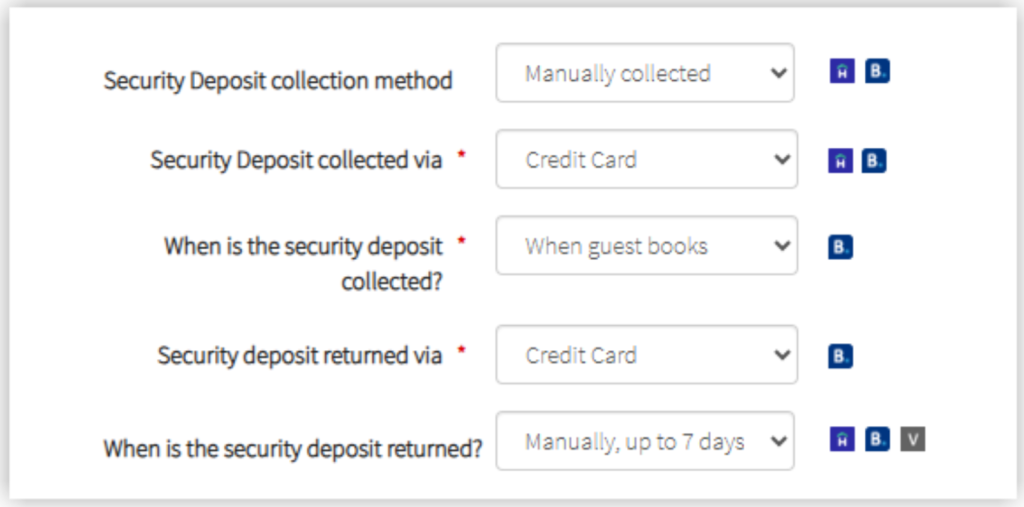
- Deposits: Security deposits cover any damage that might happen during a guest’s stay. You collect them before arrival and refund them after check-out if no issues arise.
Deposits are much easier to manage when they share the same system as bookings. That’s why Hostfully PMS lets you manage reservations, payments, deposits, and guest messaging in one place.
What should you consider when choosing a payment system?
Choosing a payment system isn’t about finding a way to collect money. You need a setup that fits your operations and provides a smooth experience while remaining practical as your business scales.
Here’s what to think about:
Fees and overall cost
Most payment processors charge a percentage per transaction plus a fixed fee. While this may seem manageable at first, costs add up quickly when you’re processing a high volume of bookings.
Calculate every fee you may need to pay, not just the advertised rate. You can compare the full costs against alternative providers to get a more realistic picture of how much you’ll spend and whether it’s a competitive amount.
Payout timing and cash flow
Check when the provider releases your funds. If you have to wait for long periods, that might interfere with your business cash flow and make it harder to cover expenses. A system that pays out quickly and predictably can make cash flow much easier to manage, especially when you have tight profit margins.
Security and compliance
Guests need to feel confident when they enter their payment details. If the check-out process looks insecure or unfamiliar, they are more likely to abandon the booking.
Strong security also protects your business against fraud and disputes if the worst should happen.
So make sure any payment system you consider meets high standards. Choosing PCI-compliant processors is one of the most effective ways to protect guest data and reduce risk. You can also check whether providers actively monitor and regularly review the system to make sure no gaps are developing in security.
Integrations with PMS and tools
Look at how well the payment system connects with tools you use every day. Bookings, payments, accounting, and guest messaging must integrate properly for you to share data across systems.
That kind of connectivity becomes especially useful as your business grows. Instead of switching between separate tools to check different operations, you can manage the process as one connected workflow.
Automation and scalability
Think about your future plans. A setup that works for one or two properties might struggle once you’re managing a larger portfolio.
That’s why you should prioritize a payment system that can work for large businesses. Look for ones with features like recurring charges, scheduled payment rules, and automatic refunds to help you handle more reservations without giving you more admin.
Guest experience and flexibility
Consider the payment process from the guest’s perspective before you commit. The easier it is for people to pay in their preferred method, the more likely they are to follow the process through to the very end — and book your property.
If possible, test the payment processor before you add it to your website. You can see if the provider has a demo version or ask to see it in action. Check it on both desktop and mobile to see whether that affects the functionality and experience, and see how well it handles currency conversions and deposits.
Accounting
Finally, make sure your payment system fits cleanly into the way you track income and reconcile transactions. If payment data is difficult to match with bookings, taxes, refunds, and fees, reporting will become much more complex and error-prone.
Look for a setup that makes it easy to separate different charges and sync data with your accounting tools. For example, Hostfully integrates with QuickBooks and connects with Ximplifi’s VRPlatform to help automate accounting data and reduce manual reconciliation. This means your team spends less time matching payments to reservations and reduces the risk of human error.
How to set up automatic payment processing
Setting up automatic payment processing is relatively straightforward when you use a PMS like Hostfully. Here are the general steps:
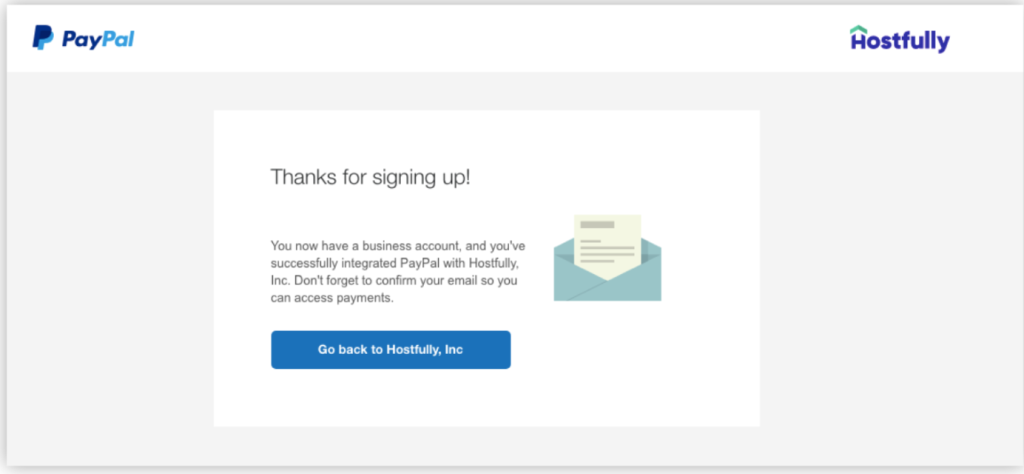
- Create a business account: Visit your payment processor’s website to go through the sign-up process.
- Link your accounts: Find the processor in your PMS by going to the integration page and selecting the icon.
- Grant permissions: Sign into your payment processor and enable the integration.
- Set your payment rules. Decide when to charge deposits, when to collect final balances, and how to handle extras like fees or upsells.
- Test the full payment flow. Before relying on automation, make sure charges, confirmations, and payouts behave the way you expect.
Simplify vacation rental payments with Hostfully PMS
Choosing the right payment setup has a direct impact on business outcomes. That’s why the best systems do more than process transactions; they help you automate deposits and balances, stay on top of cash flow, and reduce friction across the guest journey.
Hostfully PMS enables you to bring those moving parts together into one connected system, so payments support the way your operations actually run. Our platform helps you:
- Automate payment schedules for deposits, balances, and other charges
- Integrate with payment processors like Stripe, PayPal, and VacationRentPayment
- Sync bookings and payment data across your PMS and OTA channels
- Manage security deposits with more control over amounts, currency, and methods
- Sell upsells and add-ons through digital guidebooks
- Track performance and cash flow alongside the rest of your operations
This all means less time untangling payments and more confidence that bookings and transfers are moving through your business the way they should.

FAQs about vacation rental payments
What’s the best way to collect payments for direct bookings?
Payment processors such as Stripe and PayPal are usually the most efficient way to collect payments for direct bookings. They give you a secure check-out flow, more control over when you get paid, and far less work to do than handling payments yourself.
How do payout timings differ between OTAs and direct bookings?
OTAs like Airbnb and Vrbo release funds according to their own payout schedules. That can make them convenient, but also gives you less control over when the money reaches your account. Direct bookings are more flexible, since you can decide whether to collect the full amount upfront or split payments into stages.
What fees should I expect when processing vacation rental payments?
Most payment processors charge a percentage of each transaction plus a fixed fee. Depending on your setup, you may also need to account for currency conversion fees, chargeback fees, or other platform-related costs.