
Quick Summary
Listing on Furnished Finder takes about 20 minutes. You create an account, pay a $199 flat annual fee (no booking commission), complete your profile, fill in property details, set a monthly rate, and upload photos. The platform targets 30-plus-day stays for traveling professionals, primarily travel nurses. If you manage properties in Hostfully, you can skip most of the manual setup: the direct connector syncs your listing details, photos, and availability to Furnished Finder in a few clicks, and Hostfully users get up to 15% off the subscription.
Furnished Finder fills the gap between short and long-term rentals by connecting property owners with traveling professionals on 30-to-90-day stays. The platform has grown to over 300,000 listings and one million monthly users, with monthly rental demand reaching 46 million booked nights by the end of 2025 (source). That demand already reaches short-term portfolios: 39% of STR operators took at least one 30-plus-night booking in the past year, most by accident rather than by listing where those tenants actually search.
The timing argument is just as strong. More than 7 million travelers searched Furnished Finder in the last 12 months, typical stays run three to six months, and monthly demand peaks from January to March, exactly when short-term bookings slow down (Furnished Finder, 2026).
If you’re still weighing the channel at all, whether Furnished Finder is worth it comes down to your booking pattern and location, and what landlords report in their reviews is broadly positive, with lead volume the main variable. This guide assumes you’ve decided to try it and just need to get your listing live.
What does Furnished Finder cost to list on?
Before you create an account, know what you are paying. Furnished Finder charges a flat annual listing fee and no booking commission, which means you pay once and keep everything you earn. These prices took effect January 2, 2026 (source):
| Fee type | What it is |
|---|---|
| Annual listing fee | $199 per year per property (entire place, apartment, or private room), plus applicable taxes at checkout |
| Add-on units | $149 per year for each additional unit at the same address (duplex, ADU, basement apartment) |
| Hotel or apartment complex | $750 per year covers multiple units within one building ($1,000 per year starting October 27, 2026) |
| Booking commission | None. You keep 100% of what tenants pay you |
| Guest service fees | None. Tenants pay exactly the rate you set |
| Optional Listing Setup Service | Offered at checkout if you want Furnished Finder to build the listing for you |
| Hostfully user discount | Up to 15% off Furnished Finder subscriptions for properties managed in Hostfully |
The flat fee model means one long 90-day stay can pay for a year of listing many times over, and the break-even math against commission OTAs shows where the crossover sits at different monthly rates, along with every other line item you might pay.
Note that the subscription renews automatically each year, so calendar the renewal date when you sign up.
How to list your property on Furnished Finder (step by step)
These five steps cover a manual listing built directly on furnishedfinder.com. If your properties already live in Hostfully, the Hostfully and Furnished Finder connector pushes listing details, photos, and availability across automatically, which makes most of this data entry optional.
Step 1: Create your Furnished Finder account
Go to furnishedfinder.com and click List Your Property in the top right corner. Enter your basic contact details: name, address, and phone number.
The form also asks about your property type. If you will be on the premises during any part of a guest’s stay, select Private room so guests know they are sharing the space. Selecting the whole property when it is not exclusive is the fastest way to get a bad review.
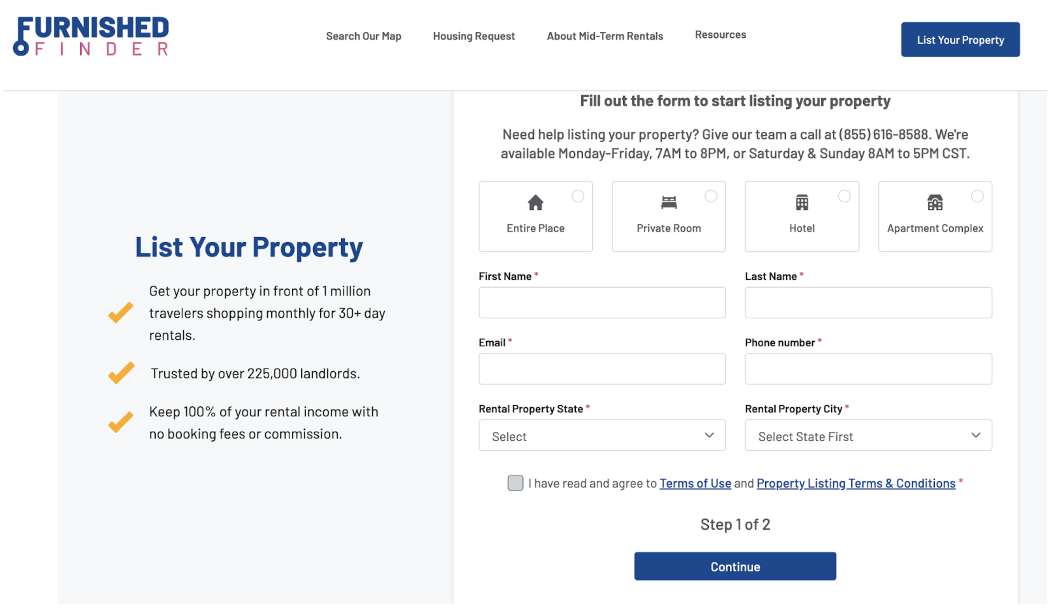
Click Continue, add your payment details for the annual subscription, and you will receive a confirmation email. Furnished Finder requires ID verification before the listing goes live, and once it does, it appears on Furnished Finder, Travel Nurse Housing, and the Furnished Finder mobile app.
Step 2: Complete your host profile
From your new dashboard, go to the sidebar and select My Profile. A complete profile ranks higher in Furnished Finder search, so fill in everything: your location and zip code, a short bio, and details about how you operate.
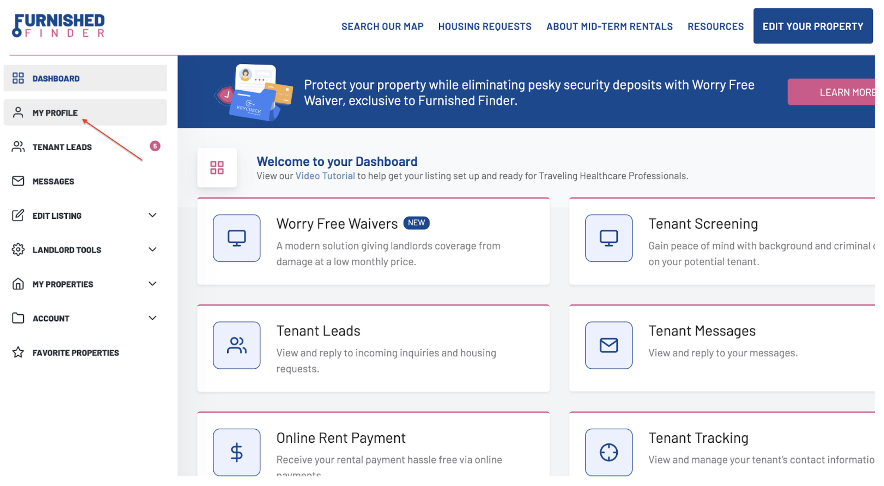
Traveling professionals vetting a 90-day stay will read your profile. A brief, credible paragraph about your hosting experience and responsiveness does more here than it would on a nightly platform.
Step 3: Edit your property details
Return to the dashboard and select Edit Listing, then Details. Choose your property from the dropdown to open the details form. Fill in everything that applies:
- Whether the property is fully furnished
- Which amenities and utilities are included (this matters more to long-stay tenants than to nightly guests)
- Whether pets are allowed
- Minimum rental period
- Parking availability
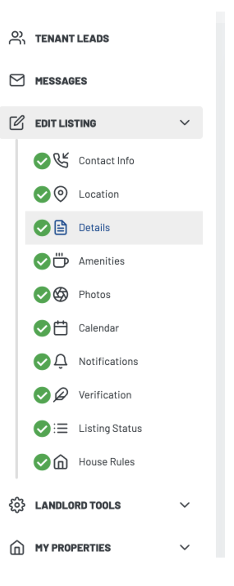
Be specific about utilities. Travel nurses and corporate travelers want to know exactly what is covered before they commit to a multi-month lease.
Step 4: Set your monthly rate
Furnished Finder lists prices as monthly rent, not nightly rates. The most important thing is matching your rate to the real earning expectations of your target tenants.
Travel nurses in the US earn roughly $6,500 a month on average (source), and many allocate around 30% of income to housing, putting the typical comfortable range between $1,500 and $3,000 a month depending on market and property size.
That said, Mitch Foster, an experienced Furnished Finder host, recommends pricing to the quality and demand in your specific market rather than defaulting to the lower end: “If I believe my property is among the top 25%, I won’t hesitate to set a higher rate. Because I always ensure I have great professional-looking photos.”
Benchmark locally, not nationally. Across 500,000+ US reservations, mid-term nightly rates averaged 47% below short-term rates, $164 against $307, but that ratio ranged from 28% to 95% of short-term rates by state, so a national rule of thumb can misprice you badly. The free mid-term rental calculator returns the break-even monthly rate for your own property from your dates, occupancy, and operating costs.
Price for reach, too: Furnished Finder reports that rentals under $2,500 a month attract more than half of renters (Furnished Finder, 2026). Check comparable listings in your area before you set a rate, and adjust if inquiries stall.
Step 5: Upload photos
Return to the dashboard and select Edit Properties, then Photos. Upload your files directly from there.
For nightly platforms you would optimize for aesthetics and wow-factor. For Furnished Finder, think about what a traveling professional needs to assess before committing to three months: workspace setup, kitchen quality, parking, laundry access, and bedroom comfort. Lead with the practical, not just the pretty.
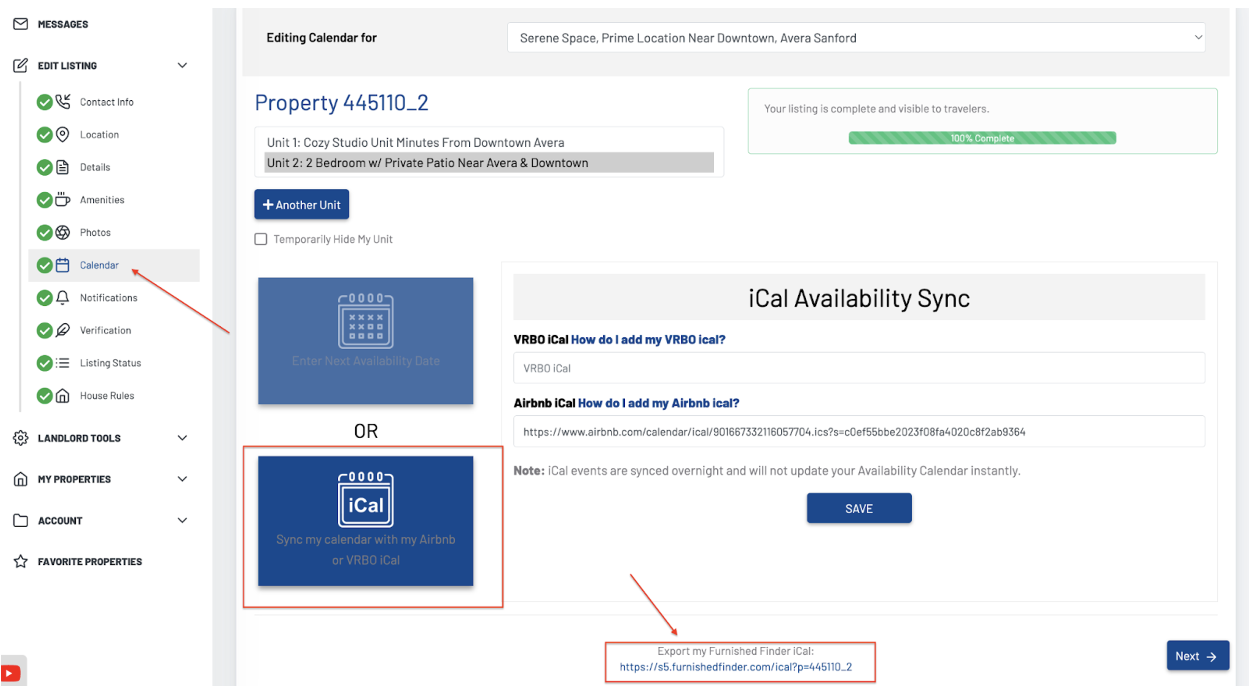
How do you sync Furnished Finder with your PMS?
If you manage your properties in Hostfully, you don’t rebuild anything by hand: the direct Furnished Finder integration, the only PMS connection to the platform, shares your existing listing details, photos, and availability with Furnished Finder. Once connected, a confirmed mid-term booking blocks those dates across every channel you manage in Hostfully automatically.
Setup takes a few clicks from inside your Hostfully dashboard.
- Open your channel settings. In your Hostfully dashboard, click your account name, then click Channels.
- Turn on Furnished Finder. Find Furnished Finder in the list of Other channels and select Connect via partner.
- Sign up for or log in to Furnished Finder. Click Allow to let Furnished Finder access your Hostfully account, and the connection is live.
- Choose the properties to share. Back in Hostfully, click the number in the account column, then toggle on the properties you want to share. Toggling all of them lets the Furnished Finder team see your full portfolio.
- Review your portfolio with Furnished Finder. Their team reaches out with a Property Fit Score, an analysis built on Furnished Finder’s own supply and demand data that flags which of your properties are best positioned for monthly stays.
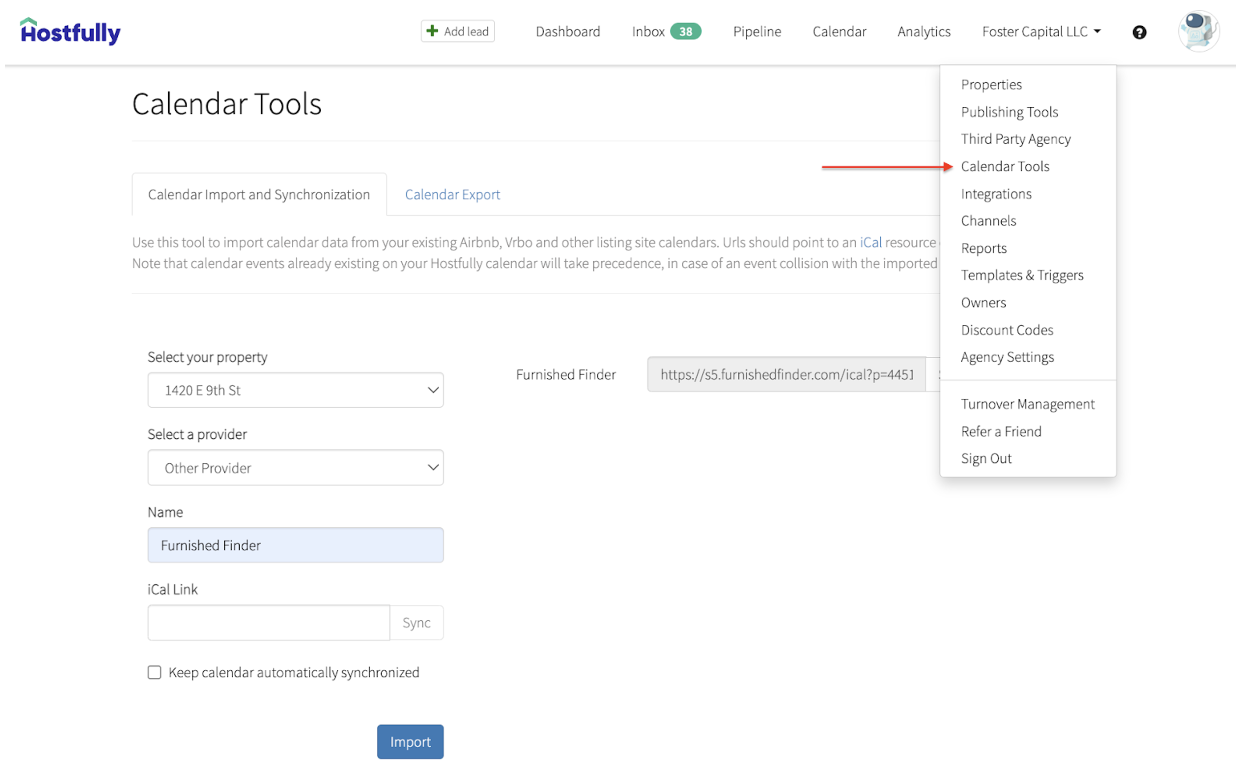
Accurate availability matters more on Furnished Finder than most hosts expect, because monthly renters book close to move-in. The average booking window is about 31 days, and 27% of renters search within a week of moving (Furnished Finder, 2026), so a stale calendar costs you the inquiries that convert fastest.
Running nightly and mid-term demand on one calendar is the job of a channel manager, and with Furnished Finder connected directly, a 90-day tenant and an Airbnb weekend can never claim the same night.
How to tailor the experience for traveling professionals
Getting listed is step one. Getting booked repeatedly requires matching your setup to what this audience actually needs, which is different from what nightly guests want.
- Lease agreement: Have a signed lease in place before any stay. Furnished Finder offers downloadable state-specific templates through KeyCheck, which also handles tenant screening, or draft your own covering house rules, deposit terms, and utility responsibilities.
- Kitchen: Unlike short-stay guests who eat out, traveling professionals cook. A full kitchen setup with oven, fridge, microwave, and basic utensils is expected, not a bonus.
- Workspace: A desk, reliable WiFi, and a comfortable chair are more important to this audience than a smart TV.
- Blackout curtains and soundproofing: Travel nurses often work night shifts and sleep during the day. Blackout curtains pay for themselves in five-star reviews.
- Parking: Medical professionals on call need immediate car access. Covered or close parking is a genuine differentiator in hospital-adjacent markets.
- Cleaning arrangement: Clarify this upfront. Monthly or biweekly cleaning suits most long-stay tenants better than weekly service.
- Digital guidebook: A Hostfully digital guidebook with parking details, appliance instructions, WiFi codes, nearby grocery stores, and local transit information lets tenants find everything without messaging you every day.
What the best mid-term listings share
Among the top mid-term performers in a study of 500,000+ US reservations, every one included parking and an on-site, in-unit washer and dryer, all itemized a complete kitchen down to the blender and toaster, and four of five specified the type of coffee maker. Listings written for someone setting up a daily routine win this audience.
Source: Hostfully MTR gap research, 2026
Furnished Finder’s own renter data points the same way: studios and one- to two-bedroom homes draw the most views and bookings, and renters rank fast Wi-Fi and in-unit laundry above luxury finishes (Furnished Finder, 2026).
How do you get more inquiries once your listing is live?
Monthly renters shop several listings at once and commit for months, so small operating habits decide who gets the booking. These four habits matter most after launch.
- Respond fast. Renters often contact several landlords at the same time, and the first credible reply usually wins.
- Keep availability current. With most renters booking within a month of move-in, an outdated calendar hides you from the most motivated searchers.
- Plan for extensions. More than a third of tenants extend their stay (Furnished Finder, 2026), so leave room on the calendar after each lease ends and price the extension in advance.
- Refresh photos and copy each season. A winter listing that still shows a summer patio signals a landlord who isn’t paying attention.
Frequently asked questions about listing on Furnished Finder
How do I post a listing on Furnished Finder?
Go to furnishedfinder.com, click List Your Property, enter your contact and property details, pay the annual listing fee, complete your profile and property details form, set a monthly rate, and upload photos. The whole process takes about 20 minutes.
How much does it cost to list on Furnished Finder?
Furnished Finder charges $199 per year per property as of January 2026, with add-on units at the same address at $149 per year and entire hotels or apartment complexes at $750 per year ($1,000 from October 27, 2026). There is no booking commission and tenants pay no guest service fees. An optional Listing Setup Service is offered at checkout, and Hostfully users get up to 15% off.
Can I list on Furnished Finder for free?
No. Furnished Finder requires a paid annual subscription of $199 per property to list. However, there is no commission on bookings, so the flat fee is the only platform cost regardless of how much you earn.
What are the requirements to list a property on Furnished Finder?
You need a verified host account (Furnished Finder requires ID verification before the listing goes live), a furnished property suitable for mid-term stays, and an active annual subscription. Furnished Finder also strongly recommends completing your host profile and filling in all property details, since incomplete listings rank lower in search.
How do I sync Furnished Finder with Airbnb or Vrbo?
Manage the property in Hostfully and turn on the direct Furnished Finder connector under Channels. Your listing details, photos, and availability sync automatically, so a Furnished Finder booking blocks the same dates on Airbnb, Vrbo, and every other channel you manage in Hostfully.
Is Furnished Finder only for travel nurses?
No. Travel nurses are the core audience, but Furnished Finder serves corporate travelers, relocating professionals, traveling faculty, military personnel, and families in transition. Any property near a hospital, corporate hub, university, or area with active construction can attract demand.
Key takeaways
- The listing process takes about 20 minutes: account, profile, property details, monthly rate, photos.
- Furnished Finder charges a $199 flat annual fee per property and no booking commission.
- Hostfully users can skip manual setup: the direct connector syncs listing details, photos, and availability, with up to 15% off the subscription.
- Tailor your setup for long-stay professionals: full kitchen, workspace, lease, and practical guidebook.
- Price to your market tier, not just the floor. Good photos support a premium rate.
- Whether Furnished Finder suits your strategy depends on monthly-rental fit and location, and landlord reviews back its legitimacy while flagging location-driven lead volume.
Once you are live, the next step is making sure your listing actually converts. Response time and a complete profile matter more on Furnished Finder than on nightly platforms, since tenants are making a longer and more considered commitment. Hostfully’s direct Furnished Finder integration keeps your calendar accurate across every platform, so you can take a Furnished Finder booking without worrying about blocking the same dates everywhere else.