

TL;DR
Vrbo offers hosts three customer service channels: a 24/7 phone line at 1-877-202-4291 (US) or 1-512-782-0805 (outside the US), an in-product live chat accessed after logging in, and a self-serve Help Center at help.vrbo.com. There is no public support email. The phone IVR routes hosts and guests separately (press 1 for English, then 1 for host), and a host-specific contact form sits at vrbo.com/en-us/supply/help/vrbo-contact-us. Use the Help Center for policy lookups and setup questions, live chat for routine account and booking issues, and the phone line for urgent problems like double bookings, fraud, payment disputes, and damage claims.
As a Vrbo host, you don’t get to schedule when problems happen. Double bookings hit at 2am, a listing drops out of search, and you don’t notice for a week. A guest disputes a damage claim mid-turnover, and every hour of delay costs you. Vrbo operates in 190+ countries with multiple support channels, but it hides the phone number, routes hosts and guests on the same line, and offers no email. This post has the host phone line, the key URLs, and the channel to use for each type of issue, so you’re not hunting for any of it when something goes wrong.
What are Vrbo’s customer service contact options for hosts?
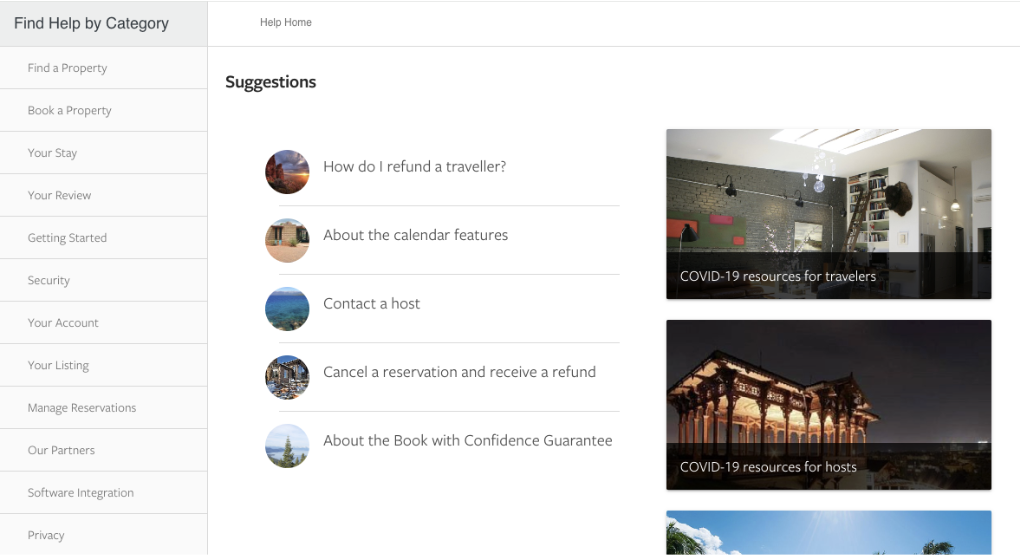
Vrbo gives hosts three primary channels: phone, live chat, and the Help Center. There is no public support email address, which catches a lot of hosts off guard when they move over from platforms that offer one.
Each channel has a different strength. The phone line is best for anything urgent or financial. The live chat handles routine account and booking questions efficiently. The Help Center solves a surprising number of issues on its own through documentation, and it’s the only one available without logging into your account.
Hosts should also bookmark these URLs:
- Main Help Center: help.vrbo.com
- Owner-filtered Help Center: help.vrbo.com/?t=owner
- Host contact form: vrbo.com/en-us/supply/help/vrbo-contact-us
- Get in touch landing page: vrbo.com/lp/b/getintouch
- Contact information by region: help.vrbo.com/category/Contact_Information
The host contact form is the one most hosts overlook. It routes inquiries directly to the supply (host-side) team rather than the general queue, which usually means a faster, more relevant response.
What’s the Vrbo customer service phone number for hosts?
The Vrbo customer service phone number for US hosts is 1-877-202-4291. For hosts calling from outside the US, the number is 1-512-782-0805. Both lines are operated by Vrbo’s main customer support team and are open 24 hours a day, seven days a week.
When you call, the IVR prompts you twice. The first prompt asks for language (press 1 for English). The second routes you to either the host or guest queue (press 1 if you’re a host, 2 if you’re a guest). Pressing the wrong option pushes you into the general guest queue, which is slower and staffed by agents less familiar with host-side issues.
Vrbo also publishes regional phone numbers for hosts in the UK, Australia, France, Germany, Italy, Spain, Brazil, and several other markets. The full list, with local hours, lives at help.vrbo.com/category/Contact_Information.
One practical note: Vrbo’s own websites don’t display the host phone number prominently. To find it, you usually need to log into your dashboard, navigate to “Help” or “Contact us,” and pick a topic before the number appears. Save it directly in your phone contacts so you’re not hunting for it during a 2am double-booking call.
Are Vrbo’s customer service hours 24/7?
Yes. The main US and international phone lines, along with the live chat, are staffed around the clock. The Help Center is always available because it’s self-serve.
That doesn’t mean every hour is the same. Vrbo aims to answer most phone calls within five minutes, but hold times stretch during peak windows: weekends, holiday transitions, summer high season, and the first week of a new month when bookings cluster. Live chat tends to queue longer during US daytime hours on weekends.
If your issue isn’t time-sensitive, the fastest response times are typically early morning US Eastern Time on weekdays. Calls placed between 6am and 9am ET often connect within two or three minutes. Calls placed on Saturday afternoon during summer can take 20 minutes or more to reach a live agent.
Is there a separate Vrbo host customer service line?
No, there isn’t a separate phone number for hosts. Vrbo uses one main line (1-877-202-4291 in the US) with an IVR menu that routes hosts and guests into different agent queues. Once you press 1 for host, you’re connected to a team trained on supply-side issues like payouts, listing visibility, calendar sync, and host policies.
For non-urgent questions, the closest thing to a dedicated host channel is the host contact form at vrbo.com/en-us/supply/help/vrbo-contact-us. It opens with “To get started, tell us who you are” and lets you select Property Manager, Property Owner, or Co-host before you submit. That routing matters: tickets submitted through the host form are picked up by the supply team, while tickets from the general “Contact us” page can end up in the wider queue.
Hosts who want documentation-only support can also filter the Help Center to owner-relevant articles at help.vrbo.com/?t=owner. It hides guest-side content and surfaces host policies, payout settings, calendar tools, and listing optimization guides.
Does Vrbo have a customer service email for hosts?
No. Vrbo does not publish a customer service email address for hosts, guests, or anyone else. The platform stopped offering email-based support several years ago and routes everything through phone, live chat, the Help Center, and submission forms.
The closest substitute is the host contact form, which produces an emailed confirmation and reply thread once you submit it. So while you can’t start a support conversation by sending an email, you can end up with one once a ticket is open.
This is the most common friction point for hosts coming from platforms with email support. The workaround is to submit through the host contact form for non-urgent issues, keep the reply thread open, and respond by email as the support agent replies. It functions like email once the ticket exists.
Which Vrbo support channel should you use for common host issues?
Match the channel to the urgency and type of problem. Phone is for anything that costs you money or risks your account standing if delayed. Chat is for moderately urgent operational issues. The Help Center is for setup, policy lookups, and questions you can answer yourself.
Here’s how that maps to the issues hosts most commonly contact Vrbo about:
Booking issues
Failed payments, suspicious reservations, and double bookings caused by sync glitches need immediate attention. Call the phone line directly for any of these. Accidental double bookings caused by your own scheduling, guest no-shows, and routine modification requests are better suited to live chat.
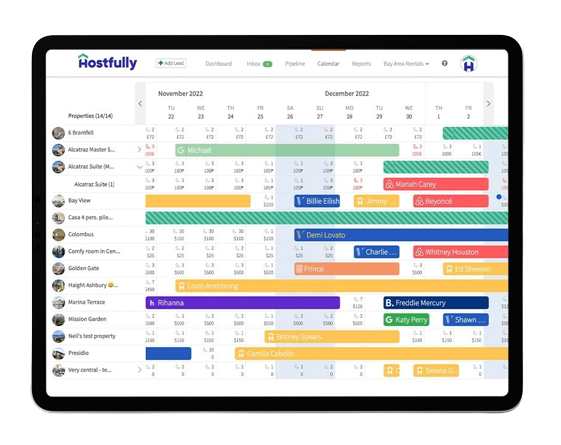
You can prevent most booking conflicts before they reach support by running a property management system that syncs calendars in real time. Hostfully’s channel manager pushes availability changes to every listing platform within minutes, and the central calendar gives you a single view across Vrbo, Airbnb, Booking.com, and direct booking channels.
Listing or calendar issues
Most listing issues are resolved through the Help Center. Things like changing your title, updating photos, or adjusting house rules are documented and can be toggled from your dashboard. Glitches like updates not saving or photos failing to upload usually clear within an hour or two on Vrbo’s end.
If a listing problem persists, escalate through live chat with screenshots ready. And before you assume your listing is fine, check what guests actually see.
Mitch Foster, Head of Partnerships and Part-Time Host, Hostfully
“I noticed my bookings dropped, so I used a visitor account to check. It turned out my listings weren’t visible at all, which gave me an opportunity to contact Vrbo support and get the problem fixed.”
Guest disputes and damage claims
Guest disputes and damage claims usually need Vrbo’s intervention. Open a ticket through live chat with documentation in hand: photos of damage, receipts for repairs or replacements, and screenshots of any guest messages relevant to the dispute. Vrbo’s damage protection program for hosts sets the documentation standards and timelines you’ll be held to during a claim.
Fraud and phishing attempts call for immediate phone action. If a guest threatens negative reviews to leverage discounts or refunds, or you spot a phishing pattern in your inbox, call the host line right away with as much evidence as you can capture.
According to Vrbo’s review removal guidelines, the platform only removes guest reviews when there’s evidence of fraud, not when the review is simply harsh or critical.
Mitch Foster, Head of Partnerships and Part-Time Host, Hostfully
“I’ve found it’s better to reach out to the guest directly when you receive especially harsh feedback. Often it’s easier to smooth things over with them, especially if there’s been some kind of misunderstanding.”
Account access issues
Getting locked out of your Vrbo account is common. The first step is always self-serve: click “I forgot my password” and reset from your registered email. If you’re locked out after multiple attempts, call the host line. Have your account phone number ready, since Vrbo often uses it for identity verification.
Account changes themselves can cause lockouts, particularly if you’ve changed your phone number or registered multiple emails.
Mitch Foster, Head of Partnerships and Part-Time Host, Hostfully
“When I first joined, I added too many email addresses to my account and got locked out. I had to call Vrbo to verify my identity. Lesson well and truly learned.”
If you notice activity you didn’t initiate, including new payout methods or unfamiliar messages sent to guests, treat it as a security incident and call immediately. Vrbo escalates suspected account compromise faster than routine access issues.
Policy or platform confusion
Policy questions are best answered through the Help Center first. Vrbo’s documentation covers cancellation policies, discount mechanics, host requirements, payout schedules, and pretty much every feature in the host dashboard. New operators often run into questions Vrbo’s Help Center answers in isolation but doesn’t tie together; how Vrbo works for property managers walks through the platform end-to-end from the host’s perspective.
Questions tied to local laws, like rental permits, transient occupancy tax remittance, or health and safety rules, often need a phone call. Vrbo can confirm what documentation it requires from you and what it can verify on your behalf, but it won’t interpret regulations for you. The platform’s own rules for owners govern what Vrbo enforces on the host side, separate from anything your municipality requires.
Tired of fielding every guest message manually?
Hostfully’s Unified Inbox with InboxAI pulls every guest conversation from Vrbo, Airbnb, Booking.com, SMS, and direct bookings into one screen, with AI-suggested replies that handle the routine messages so you can focus on issues that actually need you.
How can you speed up your Vrbo support request?
Calling sooner isn’t always the fastest path to resolution. Showing up prepared matters more. These habits consistently shorten time-to-resolution for hosts:
- Have your reservation or listing ID ready. Vrbo support asks for this immediately to pull your account. Have the phone number connected to your account nearby for identity verification.
- Rule out the obvious with the Help Center first. Many problems resolve from documentation alone. When they don’t, the Help Center often points you directly to the relevant chat or phone flow.
- Go to the right channel directly. Don’t start at the Help Center and escalate if you already know the issue needs a phone call. It adds time without adding clarity.
- Be specific and concise. Support resolves faster when you lead with what happened, when, and what you need. Write down key points before you start the call.
- Attach screenshots when possible. Images speed up verification for errors, payment discrepancies, listing glitches, and guest damage. The chat interface accepts file uploads directly.
- Call off-peak. Early morning ET on weekdays usually beats weekend afternoons by a wide margin.
- Don’t close the chat window. If your case needs escalation, keep the thread open so the next agent has context. Reopening a closed ticket is slower than continuing an active one.
- Stay logged into Vrbo. Have your profile open in another tab so you can pull dates, guest names, or transaction IDs on demand.
What can’t Vrbo customer service help you with?
Hosts regularly hit the edges of what Vrbo support can fix. The platform draws a clear line: it manages everything that happens on Vrbo, but not the operational reality of running a short-term rental business. These are the gaps you’ll have to fill yourself.
Local legal compliance
Vrbo doesn’t help you comply with local STR laws, even when non-compliance suspends your account. Permits, registrations, occupancy tax registration, safety certifications, and HOA rules are all on you.
Mitch Foster, Head of Partnerships and Part-Time Host, Hostfully
“Staying up to date with regulations is critical. Especially now, almost every city has licensing. Back when I first started, I didn’t realize I needed to check, and my town introduced short-term rental permits. I only found out when I tried to log into Vrbo and they wouldn’t let me accept any more bookings until I uploaded the document.”
Check your municipal website and state-level vacation rental rules before assuming you’re cleared to operate. Hostfully tracks current short-term rental laws by city and state in its STR regulations library.
Guest communication and expectations
Vrbo only intervenes in host-guest communication when there’s a formal dispute or a health and safety issue. Everything else, from booking confirmations and check-in instructions to mid-stay questions and review requests, is on you.
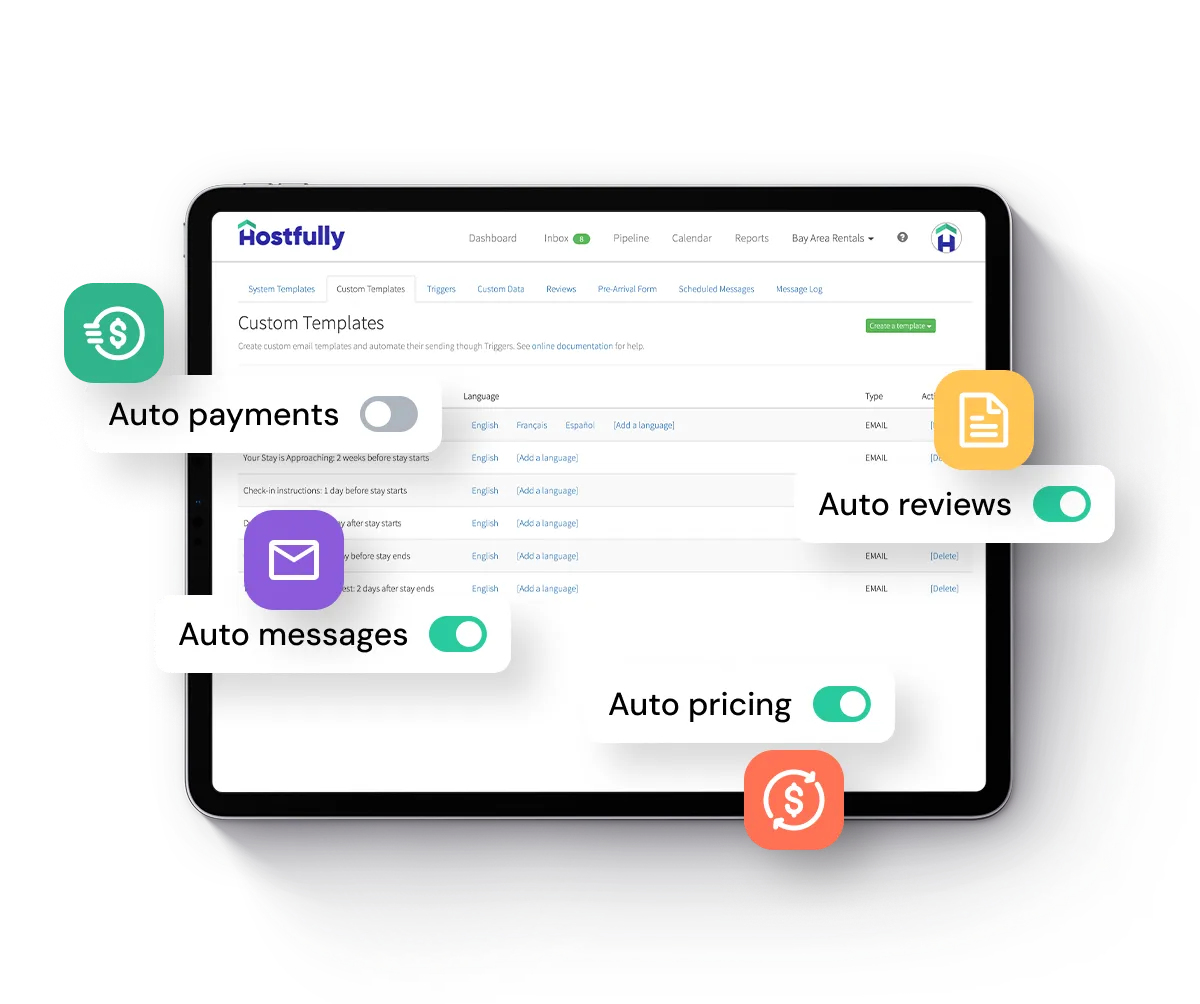
For hosts running more than a handful of properties, this gets heavy fast. Hostfully’s automation handles the repeatable parts by sending customizable, scheduled messages at every stage of the guest journey, from booking confirmation through post-stay review reminders.
Property maintenance and cleanliness
Scheduling cleaning crews, coordinating maintenance, and verifying turnovers are not Vrbo’s responsibility. The platform only steps in when guests file a formal complaint, at which point your account is already exposed to a bad review.
Managing crews from a distance is the hard part. Without direct oversight, you can’t easily verify that a cleaner showed up, completed every task, and left the property guest-ready. Hostfully’s task management assigns turnover tasks to crews, notifies them through the mobile app, and surfaces incomplete work before the next guest arrives.
Listing performance and optimization
Vrbo’s listing advice stops at meeting platform standards: character limits, image counts, and minimum amenities. Beyond that, ranking and conversion depend on factors Vrbo support won’t coach you on, like title structure, photo quality, pricing competitiveness, and review velocity.
If your listing is meeting Vrbo’s requirements but underperforming, the fix is usually editorial. Tighter vacation rental property descriptions and a competitive nightly rate set through dynamic pricing tools tend to move conversion faster than another support call.
Where Hostfully fits into Vrbo support
Vrbo’s support stack handles what happens on Vrbo. What happens outside it, the calendar conflicts, the guest messages, the turnover coordination, is where a PMS earns its keep. Hostfully integrates directly with Vrbo and every other major channel so the issues that send hosts to support in the first place happen less often. It also connects Vrbo with Airbnb, Booking.com, and direct bookings so your inventory stays in sync without the manual reconciliation that generates most Vrbo support tickets.

Frequently asked questions about Vrbo customer service for hosts
What’s the fastest way to reach a real person at Vrbo?
Call the host phone line at 1-877-202-4291 (US) or 1-512-782-0805 (outside the US), press 1 for English, then 1 for host. Vrbo aims to answer most calls within five minutes. For non-urgent issues, the live chat in your dashboard usually connects to a human agent within a few message exchanges with the AI assistant.
Does Vrbo offer customer support outside the US?
Yes. Vrbo provides regional phone numbers for the UK, Australia, France, Germany, Italy, Spain, Brazil, and several other markets. The complete list, including local hours of operation, is published at help.vrbo.com under Contact Information. Hosts outside the US can also use the main international line at 1-512-782-0805.
How long does Vrbo take to respond to a host inquiry?
Phone calls usually connect within five minutes off-peak. Live chat is similar for routine queries but can stretch to 15 to 20 minutes on weekends. Host contact form submissions typically receive a response within 24 hours during normal periods, longer around US holidays and summer high season.
Who has better customer service for hosts, Airbnb or Vrbo?
Neither platform consistently wins. Vrbo gives hosts faster access to live phone support and a dedicated supply team. Airbnb has stronger in-product self-serve flows. For day-to-day operational support, hosts running multi-platform operations tend to use both, but rely on their PMS rather than either platform’s support team for the bulk of their work.
What information should hosts have ready before contacting Vrbo?
Have your account phone number, listing ID, and any relevant reservation ID open. For booking disputes, gather screenshots of messages, payment records, and date confirmations. For damage claims, photos and repair receipts. For listing issues, the affected URL and a screenshot of what guests currently see.
Can hosts escalate Vrbo support issues?
Yes, but the escalation path runs through whichever ticket you opened. Keep the chat window or call thread open and ask the agent to escalate before they close the ticket. Once a ticket closes, reopening it usually takes longer than the original contact. For unresolved disputes, the host contact form provides a documented escalation route.
Key takeaways
The fastest path through Vrbo’s support stack depends on knowing the right number, the right channel, and what falls outside Vrbo’s scope entirely.
- Vrbo’s main US host phone line is 1-877-202-4291. International hosts call 1-512-782-0805. Both run 24/7.
- Contacting the host line directly is faster than letting chat or email routing guess at your issue type. Save the number in your phone now, not during the incident.
- There’s no support email. Use the host contact form for non-urgent written tickets and the live chat for routine operational questions.
- Match channel to urgency: phone for financial or fraud, chat for booking and account issues, Help Center for setup and policy.
- Vrbo support won’t cover local compliance, guest communication, property maintenance, or listing optimization beyond platform minimums. A PMS handles the gaps.
Stop solving problems Vrbo support was never built to fix
Hostfully’s PMS connects every channel, automates guest communication, and keeps your operations running so the issues that send hosts to support in the first place happen less often. Book a free demo to see it in action.